
Pimcore integration work is rarely about the API itself. The endpoints are documented and they behave. What breaks a production integration is the part nobody wrote down: which system owns which field, what happens when the upstream export changes shape, and who finds out when the nightly job fails.
This is a practical guide to the three ways data leaves and enters Pimcore, and to the patterns that hold up after a couple of years. It assumes you already run Pimcore and are deciding how to connect it to an ERP, a shop, a DAM, or a translation system.
The three ways in and out of Pimcore
Pimcore gives you the Data Hub, the REST web services, and whatever you write yourself as a Symfony controller. They are not competing options so much as different tools.
The Data Hub adds a configurable GraphQL endpoint. You define which classes, which fields, and which permissions each endpoint carries, and consumers query for exactly what they need. The important property is that the schema is explicit: adding an attribute to a class does not automatically publish it. Somebody has to open the Data Hub configuration and decide.
The REST web services cover object and asset operations directly. They are useful for writes and for tooling, and they are the simpler thing to reach for when the consumer is a script rather than a product.
Custom controllers are for the cases neither covers well: a bulk endpoint shaped exactly like a partner expects, a webhook receiver, or an operation that has to touch several objects and either fully succeed or fully fail.
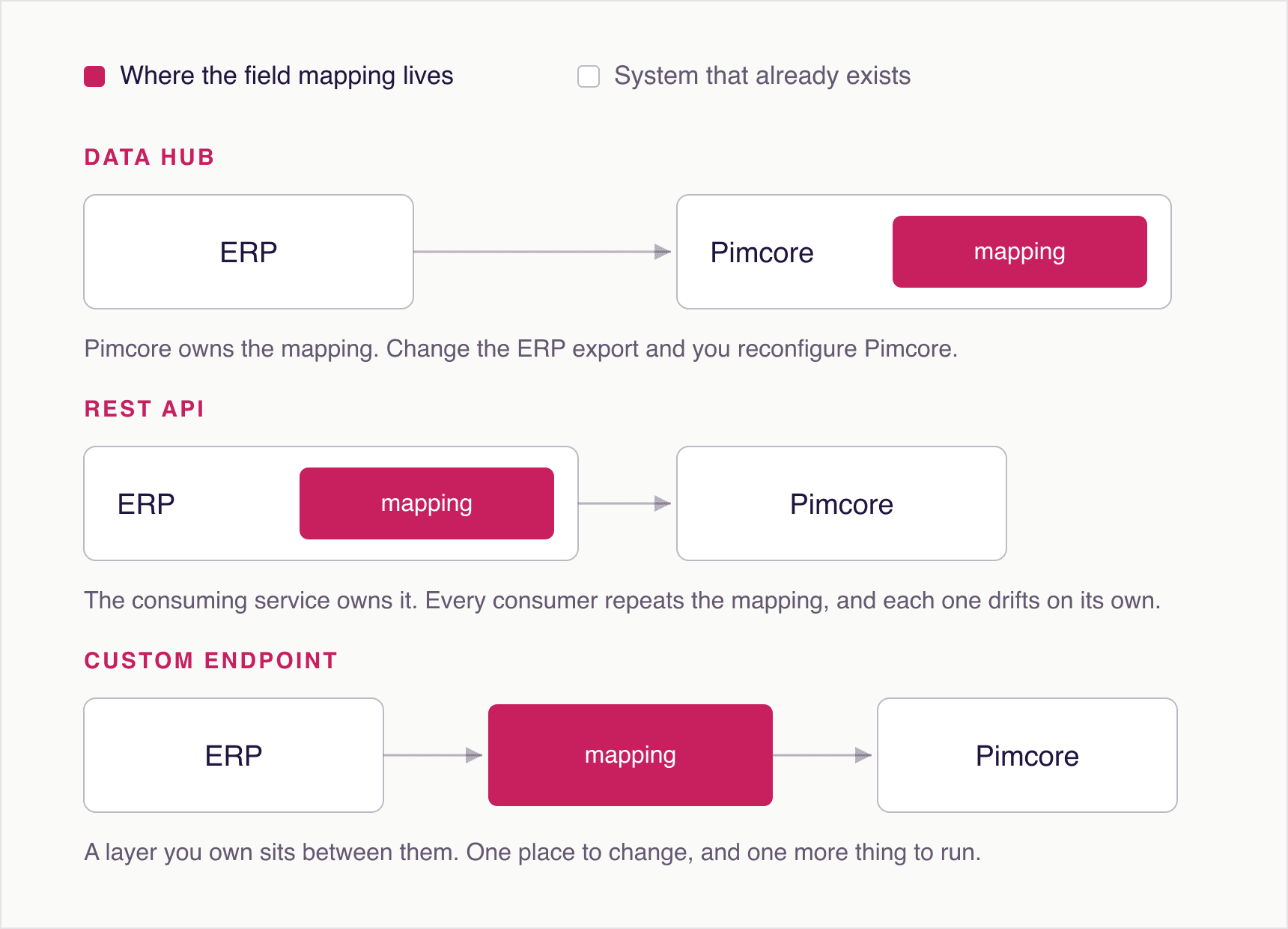
- Data Hub GraphQL: read-heavy consumers, shops, portals, partner feeds, anything where the field set differs per consumer
- REST web services: writes, admin tooling, scripts, integrations you control on both ends
- Custom controllers: transactional operations, partner-specific payload shapes, webhook endpoints
Why GraphQL usually wins for reads
A shop needs eight fields. A print catalogue generator needs a different twelve. A partner feed needs six plus a computed price. With REST you either build three endpoints or ship one fat payload and let each consumer discard most of it.
With Data Hub each consumer sends the query it needs. That reduces payload size, but the more valuable effect is on change: adding a field to a class no longer risks changing what an existing consumer receives, because the consumer named its fields explicitly.
The trade-off is configuration. Data Hub endpoints are a thing to maintain, and it is easy to end up with several that nobody remembers configuring. Name them after the consumer, not after the data, and write down who owns each one.
ERP synchronisation, and the four rules that keep it alive
This is where most Pimcore data integration work actually lives. The ERP is upstream and owns the commercial truth. Pimcore owns the enriched product record. Somewhere between them, a scheduled job moves data, and that job is the single most fragile part of the setup.
Four rules make the difference between an import that runs for years and one that produces a quiet incident every quarter.
- Decide field ownership explicitly and put it in code. If the ERP owns the article number and the price, Pimcore must not let an editor change them. Ambiguous ownership is how two systems end up both right and disagreeing.
- Key everything on a stable external identifier, never on the Pimcore object ID or the object path. Paths change when somebody reorganises a folder, and then your import creates a second copy of every product.
- Stage and validate before writing to live objects. Load the file, check it against expectations (row count within a sane band, required columns present, encoding intact), and only then write. An ERP export that silently drops half its rows should stop the import, not empty half your catalogue.
- Make failures loud. An import that fails into a log file nobody reads is the same as no import. Alert into whatever channel the responsible team actually watches, and include enough context to act on.
Idempotent imports, in practice
Idempotent means running the same import twice leaves the same result as running it once. This sounds obvious and is routinely violated, usually by imports that create rather than upsert.
The pattern is: look up by external identifier, create only if nothing is found, otherwise update in place. Compare before writing, so an unchanged record does not produce a new version entry. On a bulk load, disable versioning for the duration and re-enable it afterwards, or the version tables will grow faster than the data.
// Upsert keyed on the external identifier, not on path or ID.
$product = Product::getByExternalId($row['external_id'], 1);

if (!$product) {
    $product = new Product();
    $product->setExternalId($row['external_id']);
    $product->setParent(Service::createFolderByPath($targetFolder));
    $product->setKey(Service::getValidKey($row['external_id'], 'object'));
    $product->setPublished(true);
}

// Only write when something actually changed: an unchanged row should not
// create a new version entry on every nightly run.
if ($product->getName() !== $row['name']) {
    $product->setName($row['name']);
    $dirty = true;
}

if ($dirty) {
    $product->save();
}
The mistakes that cost the most
Some integration problems are expensive because they are silent. These are the ones worth checking for on an instance you have inherited.
- Writing to localized fields without specifying the language, which quietly writes into whatever locale the request context happened to carry
- Importing on every upstream change instead of on a schedule, which turns a busy ERP day into a load problem and makes failures hard to reproduce
- Leaving versioning enabled during a bulk import, which can grow the version tables by more than the data itself
- Exposing a Data Hub endpoint with broader permissions than the consumer needs, usually because it was quicker during development and nobody revisited it
- No monitoring on the connection at all, which is the single most common finding when we assess an inherited instance
Not sure which of these apply to the instance you already run? The health check answers exactly that, at a fixed price, in a week.
Pimcore Health Check →Translation and DAM round trips
Translation systems and asset libraries are integrations too, and they have a specific failure mode: overwriting newer content with older approved content. A translation job leaves with a source text, spends two weeks in review, and comes back to find the source has changed. If the import writes blindly, the newer edit disappears.
The fix is to carry a version marker with the job and compare on return, then route the conflicts to a human instead of resolving them silently. For assets, the equivalent rule is that Pimcore should reference the asset by identity rather than by a copied file, so the approved version is the one products actually point at.
Where to start on an instance you did not build
Inventory first. List every scheduled job, every Data Hub endpoint, and every place credentials for an external system are stored. On most inherited instances that list is longer than anybody expected and at least one entry is a mystery.
Then check monitoring, because that is usually the cheapest real improvement available. An integration that fails loudly is a manageable problem. One that fails quietly is the reason somebody eventually asks why a market has been missing three products since spring.
We build and repair these integrations for manufacturers across Austria and Germany, including on instances another agency implemented.
Pimcore development and integration →